🔄 Rebasing in Git: Basic Rebasing, Interactive Rebasing, and Practical Use Cases
Explore Git rebasing with GitAndVersionControlHub.com, your resource for mastering advanced Git techniques and modern version control workflows. This subcategory explains how to use basic rebasing, interactive rebasing, and real-world rebase strategies to create a cleaner project history, update feature branches, and prepare code for collaborative development. Whether you are working alone or contributing to a team through GitHub or GitLab, these tutorials provide practical guidance for using git rebase safely and effectively.
📘 Understanding Basic Git Rebasing
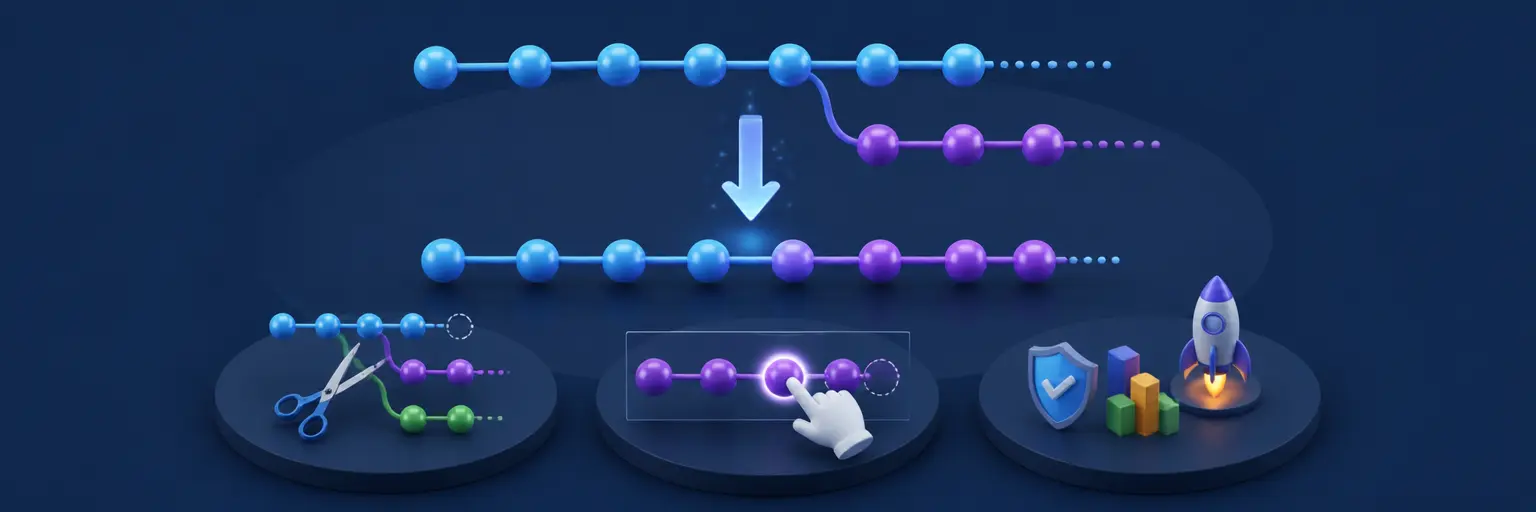
Learn what Git rebasing does and how it differs from merging. A rebase moves or reapplies commits from one branch onto a new base commit, allowing developers to incorporate the latest changes from a main or development branch while maintaining a more linear history. Step-by-step tutorials cover commands such as git rebase main, branch synchronization, commit replaying, and updating local feature branches.
Readers will also learn how to identify suitable rebasing situations, inspect branch history, and recover from common problems. Topics include rebase conflicts, conflict resolution, git rebase --continue, git rebase --abort, and verifying changes after a successful rebase. These lessons are designed to help developers build confidence before applying rebasing in shared repositories.
🛠️ Interactive Rebasing for a Cleaner Commit History
Interactive rebasing gives you detailed control over your commit history before sharing changes with other developers. Using git rebase -i, you can reorder commits, edit commit messages, squash multiple commits, fix incomplete commits, and remove unnecessary changes. This makes interactive rebase especially useful for preparing a feature branch for code review or a pull request.
Our tutorials explain interactive rebase commands in a practical, easy-to-follow format. You will learn how to use actions such as pick, reword, edit, squash, fixup, and drop, while understanding the risks of rewriting history. You will also discover how to create meaningful commits that improve debugging, collaboration, release management, and long-term project maintenance.
🚀 Common Git Rebase Use Cases
Discover how rebasing fits into everyday Git workflows. Common use cases include updating a feature branch with the latest changes from main, keeping a branch current during long development cycles, organizing commits before a pull request, and preparing a clean history for release. Rebasing can also help developers reduce unnecessary merge commits and make project history easier to understand.
These guides cover rebase workflows for individual developers and teams using GitHub or GitLab. You will learn when to choose rebasing over merging, how to coordinate rebases during collaborative development, and how to avoid rewriting commits that other contributors already depend on. Practical examples emphasize safe Git workflows, code review readiness, and reliable branch management.
⚠️ Resolving Rebase Conflicts Safely
Rebase conflicts occur when Git cannot automatically apply a commit to the new base. Learn how to read conflict markers, inspect affected files, compare branch changes, and make informed decisions during conflict resolution. The tutorials explain how to stage resolved files and continue the operation with git rebase --continue.
You will also learn how to stop a problematic rebase using git rebase --abort and how to review the result with git status, git log, and comparison commands. Clear conflict-resolution practices reduce the risk of lost work and help developers handle complex rebases with greater confidence.
🔐 Safe Rebasing and Rewriting Git History
Because rebasing rewrites commit history, it should be used carefully when working with remote repositories. Learn why rebasing local, unpublished commits is usually safer than rebasing commits already shared with a team. The content explains how force pushing can affect collaborators and introduces safer approaches such as git push --force-with-lease.
These lessons also cover backup branches, reflog recovery, commit inspection, and best practices for protecting important work. By understanding the consequences of history rewriting, you can use Git rebase without accidentally disrupting shared branches or removing commits that teammates still need.
❓ Frequently Asked Questions About Git Rebasing
What is Git rebase?
Git rebase is a command that moves or reapplies commits from one branch onto another base commit. It is commonly used to update a feature branch with the latest changes from main and create a more linear project history.
What is the difference between git merge and git rebase?
Git merge combines branch histories and may create a merge commit, while git rebase rewrites commits so they appear to have been created from a new base. Rebasing can produce a cleaner history, but merging is often safer for commits already shared with other contributors.
When should I use interactive rebase?
Use interactive rebase when you need to clean up local commits before sharing them. It is useful for squashing related commits, editing commit messages, reordering changes, removing accidental commits, and preparing a clear pull request.
How do I resolve a conflict during rebasing?
Inspect the conflicting files, edit them to keep the correct changes, and stage the resolved files with git add. Then run git rebase --continue. If you decide not to proceed, use git rebase --abort to return to the state before the rebase began.
Is it safe to rebase a shared branch?
Rebasing a shared branch can disrupt other developers because it changes commit identifiers and history. Rebase unpublished local work whenever possible. If shared commits must be rewritten, communicate with the team first and use git push --force-with-lease rather than a standard force push.